
Wheres The Bus
How To Sign Up
Create Account - Go to wheresthebus.com and click the 'Create Account' button.
Select District - Select 'Caldwell County School District' from the drop-down menu
Add Student - Click the 'Add Student' button and enter student date of birth and student ID number.
Once your information is validated, you will receive an email with instructions and download information.
Screen Overview
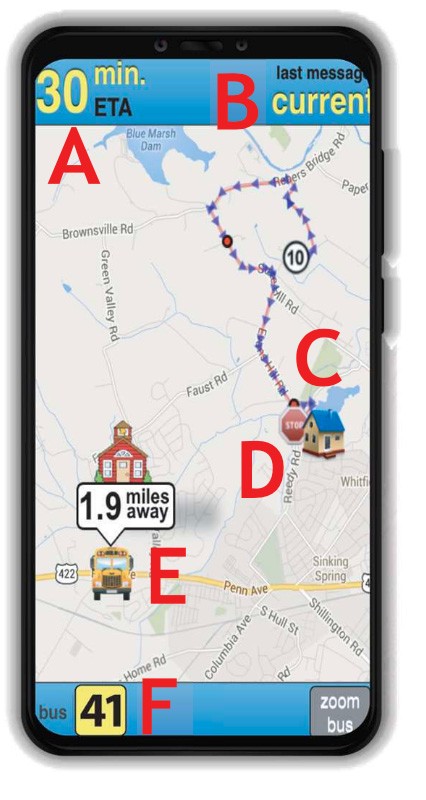
Arrival Status
Estimated time of arrival (ETA) is displayed when bus arrival time can be predicted. When a prediction is unavailable, use the bus location and distance from your stop.
Last Message
“Current” is displayed when bus data has been received in the last minute. If updates are not received, the bus is likely stopped at a school or layover or inactive (no messages in the last 15 minutes).
Your House
Your house is represented by home icon.
Your Bus Stop
Your bus stop is represented by stop sign icon.
Bus Location & Distance
Represented by bus icon and distance.
Bus Number
Click on the bus # to switch between buses (if multiple). If bus 36 were subbing for bus 41, it would be displayed as 36(41).
FOR MORE INFORMATION VISIT: